 Help Center
Instructions define behavior, knowledge supplies facts, and tools allow outside actions. Review each separately: a source marked Completed does not prove that the employee used it correctly.
Before you begin
Choose one employee and an owner for its source material. Keep an approved copy of the source so you can compare answers with exact facts.
Steps
1. Write the core instructions
Open the employee in Employees, choose Edit, and review Instructions. State the job, permitted sources, response boundaries, and when to hand off to a person. Use Persona for tone and working style.
2. Prepare sources for reliable answers
Use a small, current source with clear headings, dates, and consistent facts. Remove conflicting versions and information the employee should not disclose. Keep a checklist of questions and exact expected answers.
3. Add a website when the source is public and stable
In a supported Add document menu, choose Add website link, enter Website address, and select Add link. Review the page yourself first. The form describes adding that page; do not assume it includes every page on the website.
4. Add supported files
Choose Add files and follow the current file guidance. In the edit form, new document items are added when you choose Save employee. Check the saved employee's Knowledge tab afterward.
5. Add written content for short, controlled material
Choose Add text, paste the approved notes, FAQs, or policy, and review the text before adding it. Save the employee when editing an existing configuration.
6. Respect Presenter source guidance
The hiring form describes Presenter as using one PDF or video and excludes website links and text. The Presenter setting is disabled in Edit. Decide the capability before hiring and validate a separate employee if you need a different setup.
7. Give connected actions the least access needed
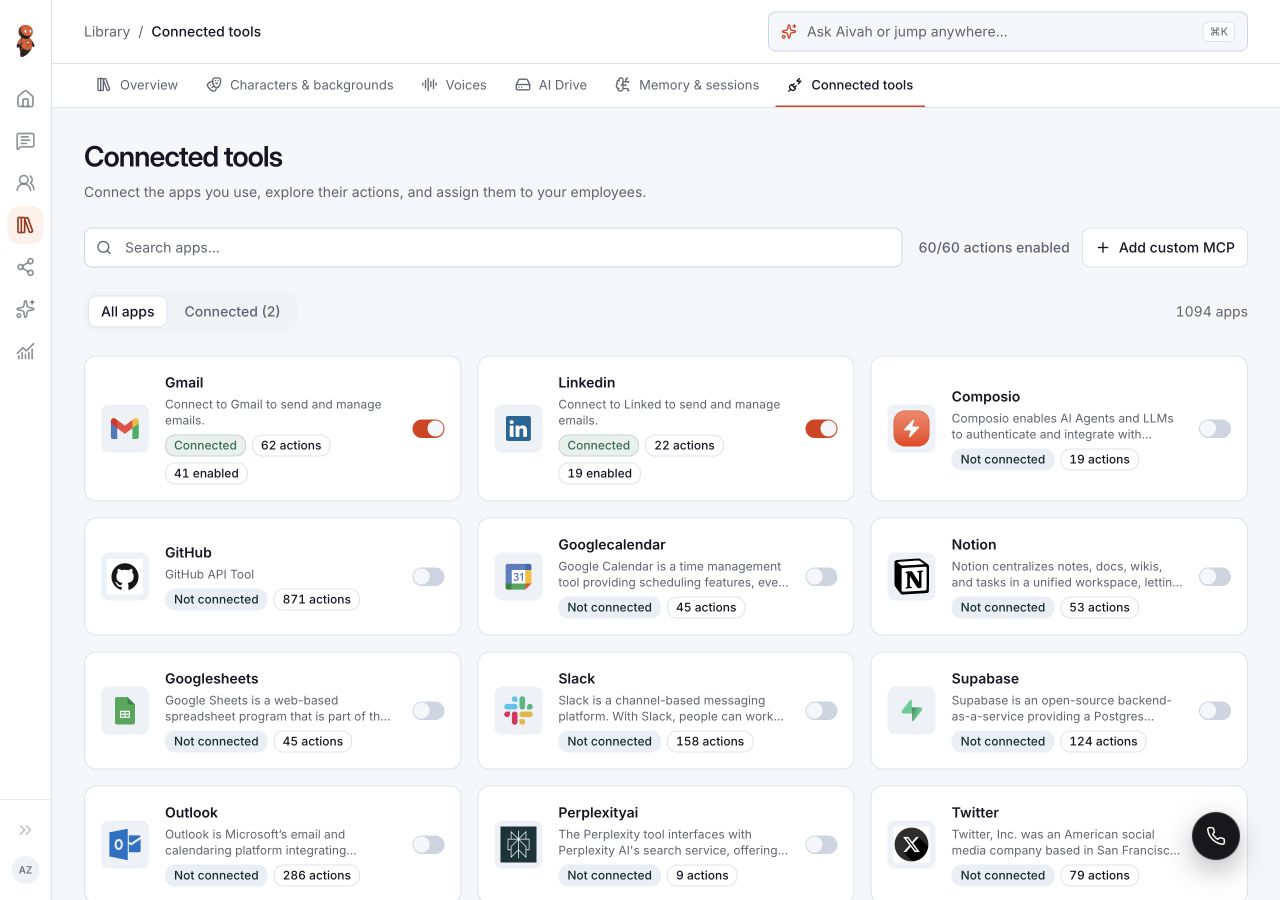
Use Library → Connected tools to manage available connections. The hiring form assigns up to three tools; review template selections before saving. The employee's Tools tab lists assigned apps and directs you to choose them during hiring.
An assigned app is not proof that an action succeeds or that every permission is appropriate. Test only the actions the job needs, with approved test data and confirmation for consequential actions.
 View full screenshot ↗
8. Wait, test, and revise
Review each source in Knowledge and overall Training status in Overview. After processing completes, open Talk to [employee name] and compare answers with the source. Include an unknown question and a request outside the job.
If a response contradicts a completed source, keep the example and investigate before deployment. Repeating the question alone does not establish that the source problem is fixed.
Expected result
You have reviewed instructions, source content, processing status, and assigned tools. Your test record distinguishes correct source-based answers from unresolved failures.
Status meanings
Completed is a processing status. No tools assigned is an assignment state. A correct answer requires a separate comparison with the source, even when both configuration and processing look ready.
Usage credit impact
Source processing, AI drafting, tests, and tool activity may use credits. Review current notices and balances before repeating a large operation.
Information stored or shared
Saved instructions and sources become part of the employee configuration. Connected services can receive information needed for an action. Never paste passwords, private keys, or unnecessary personal records into instructions or sources.
Limits and permanent actions
Do not assume website crawling depth, file compatibility, tool reassignment, or removal recovery beyond the controls and guidance shown. Keep source copies and review dependent uses before removing material.
Common problems and recovery
- Conflicting answers: compare source versions and identify the exact conflicting fact.
- The source is completed but the answer is wrong: preserve the prompt, response, source excerpt, and time; do not mark the employee ready.
- A needed tool is unavailable: check its connection in Connected tools and the employee's assigned Tools.