
How does website AI turn visitors into leads?
Website AI lead capture starts with a short form that asks for a name and email before the chat. Your AI employee then answers questions and learns what the visitor needs. Your team follows up from one list of leads and reads each chat before replying.
Say Northgate Kitchens, a fictional kitchen fitter, puts a chat bubble on its pricing page. A visitor asks about a small kitchen and leaves her name, email and phone number. The next morning, a designer reads the chat and calls her with a rough quote.
- The lead form shows before the chat. Ask only for what your team will use.
- Your instructions decide which questions it asks, one at a time.
- Good fits get your booking link. Others get a useful next step.
- Every lead lands in Insights → Leads, ready to export as a CSV file.
- A person still replies. Decide who does it, and how fast.
Read related guides
Why does replying fast matter?
Leads go cold while they wait. For a 2011 Harvard Business Review study, researchers sent test leads through the websites of 2,241 US companies.
Only 37% replied within an hour, and 23% never replied at all. Among companies that replied within 30 days, the average wait was 42 hours.
The study is from 2011, so treat the numbers as a warning, not a benchmark. Your AI employee answers the first questions straight away. Your team still owns the reply that wins the job.
Sources
Put an AI employee on your website.
Add it as a chat bubble, an embedded page or a link. Visitors can type, talk or see its face.
See it on a websiteWhat should your lead form ask?
Aivah’s lead form has four field types: name, email, phone and your own questions. You choose which fields are required. Fewer fields means more people fill it in.
A new form starts with a general consent line. Replace it with your own words, such as: “We’ll use your email to answer your question and send you a quote. You can ask us to stop at any time.”
Have someone who knows your local privacy rules check that text. Never ask for passwords, card numbers or other sensitive details. The US Federal Trade Commission’s guide for businesses says it plainly: if you don’t need sensitive data, don’t collect it.
- Name and email: enough for most first replies.
- Phone: only if your team will really call.
- One question of your own, such as “What do you need help with?”
- Consent text: one plain sentence on how you’ll use the details.
How should your AI employee qualify a visitor?
Qualifying means finding out whether a visitor is a good fit before your team spends time on them. Answer their question first. Then ask a few short questions, one at a time.
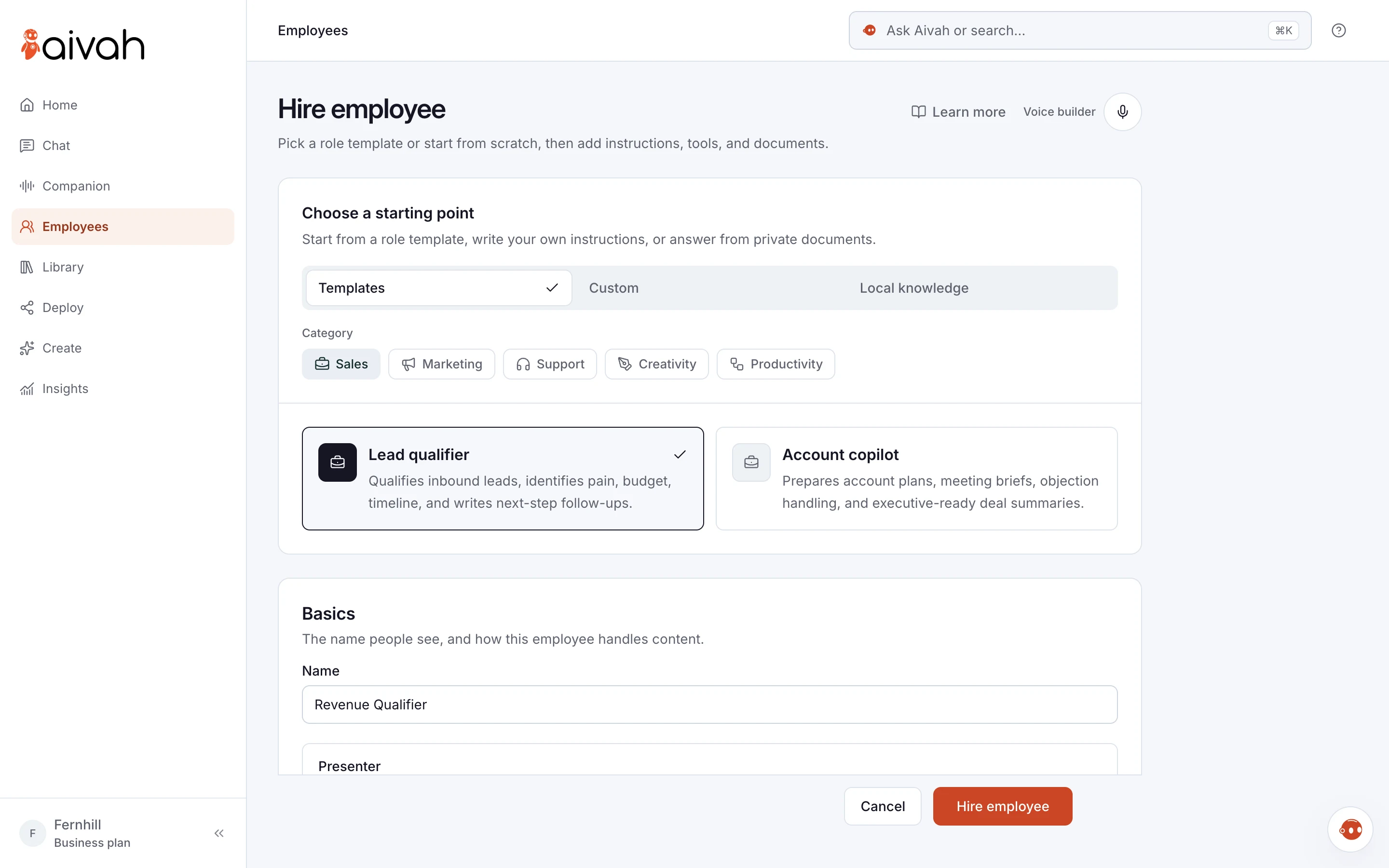
Start from the Lead qualifier role template. Add your product and price pages as knowledge. Then paste instructions like these and fill in the brackets:
“Answer questions from our website and documents. When a visitor shows interest, ask about [need], [timeline] and [budget], one at a time. If they fit [your criteria], share [booking link]; if not, point them to [resource].”
Northgate Kitchens asks about room size, start date and budget range. Visitors planning within three months get the link to book a design visit. The rest get a free planning guide.
Read related guides
How does the handover to your team work?
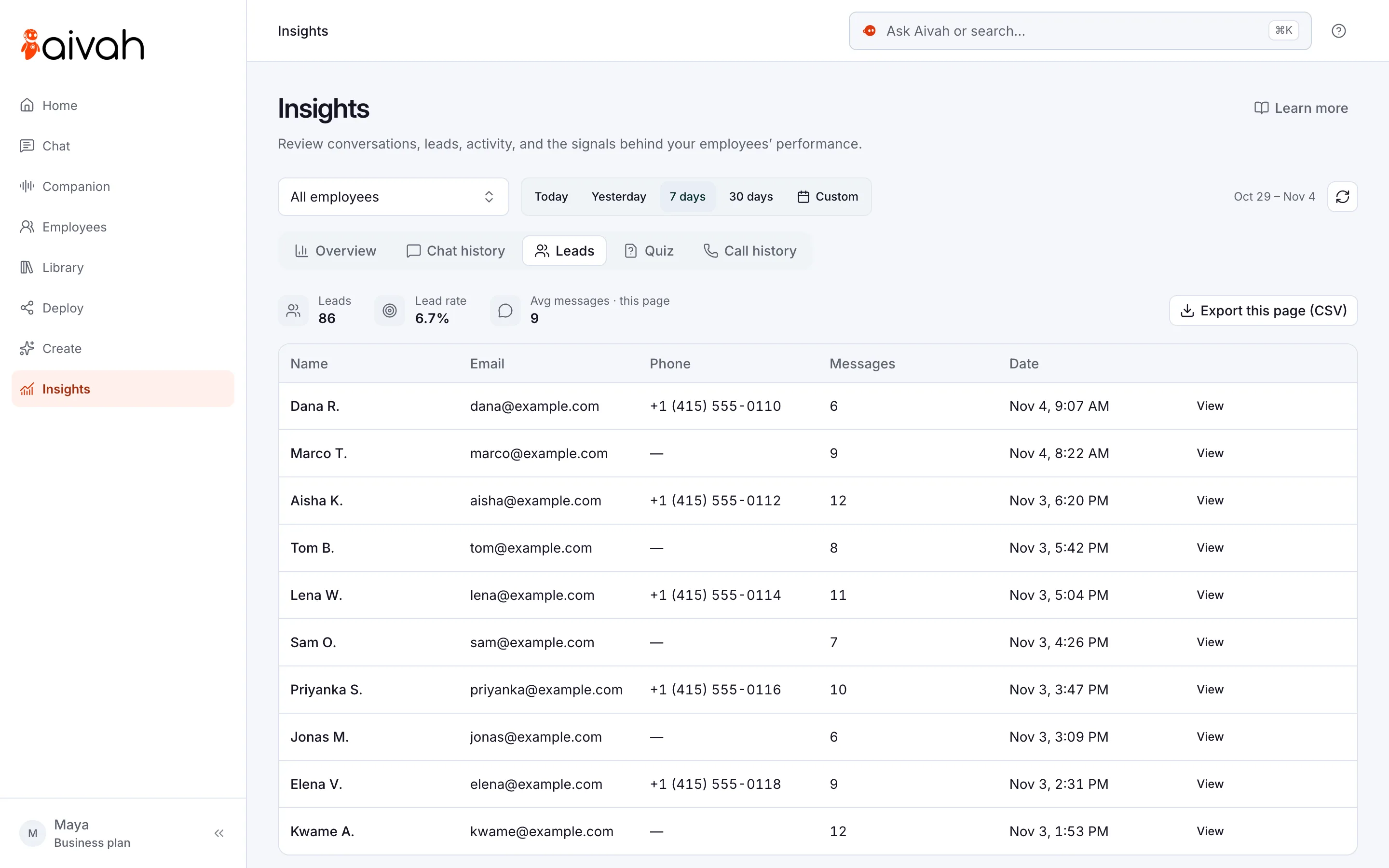
Every visitor who fills in the lead form appears in Insights → Leads. Insights is the part of Aivah that keeps your chats, leads and calls.
Each lead shows the name, email, phone, number of messages and date. Open a lead to see every field they filled in, then open their chat in Chat history. Export this page (CSV) downloads the leads on screen, ready for a spreadsheet or your CRM.
The handover works only if someone owns it. Decide who checks Leads, how often and how fast they reply.
- Check Insights → Leads at set times, such as 9am and 2pm.
- Read the chat first, so the customer never repeats themselves.
- Reply to their actual question, not with a general pitch.
- Tell your AI employee what happens next, such as “Our team replies within one working day.” Only promise what you keep.
Read related guides
How do you set it up, step by step?
You need the Hobby plan or higher to put the employee on your website. Plan on about half an hour for the rest.
- Step 1. Hire an AI employee from the Lead qualifier template, or describe the job yourself.
- Step 2. Add your product, pricing and FAQ pages as knowledge.
- Step 3. Write the qualifying instructions above, with your own questions and booking link.
- Step 4. In Deploy → Web & embeds, choose Create experience. Pick Chat bubble and your employee, then choose Add lead capture form.
- Step 5. Add a title, consent text and your fields, then choose Confirm. Finish the look and publish.
- Step 6. Paste the code into your site, and check it shows on your pricing, product and contact pages.
- Step 7. Send a test lead and find it in Insights → Leads.
Read related guides
What are the limits of website lead capture?
Lead capture works best when everyone knows what it does and doesn’t do. Check these before launch.
- Only form details become leads. If a visitor types an email into the chat, it stays in Chat history, not in Leads.
- One form per employee. Every web experience that uses the employee shows the same form.
- The handover is a follow-up. Your team replies by email or phone, not inside the visitor’s chat.
- A chat is not a sale. Count the leads your team accepts, not the number of chats.
- In finance, legal or health, it shouldn’t give advice. Have it take the question for a qualified person.
Questions people ask about website lead capture
What is website AI lead capture?
It’s an AI employee on your website that answers visitors and collects details from people who want a follow-up. In Aivah, a lead form asks for details before the chat, and every lead lands in Insights → Leads.
When does the lead form appear?
Before the chat starts. Keep it short, mark only the fields you need as required and explain why you ask. Then the chat can focus on the visitor’s question.
Can I move leads into my CRM?
Yes, by export. In Insights → Leads, choose Export this page (CSV) to download the leads on screen. Then import the file into your CRM or a spreadsheet.
Can the AI employee book a call for the lead?
Set it up to share your booking link with visitors who fit. They pick a time in your own booking tool, and your team can read the chat before the call.
How many questions should it ask?
Usually three or fewer, one at a time, after it has answered the visitor’s own question. More than that turns a helpful chat into a form.
What does website lead capture cost?
You can build and test free, with no card. Putting the employee on your website starts on Hobby, at $10 a month. Credits are what your employee uses to reply, from 20 credits a reply.
Start with one page and one form
Start free, hire a Lead qualifier and send yourself a test lead. When it works, put it on your pricing page.
Read related guides