
How can an online shop use AI for customer service?
An online shop can use AI for customer service by giving an AI employee its product pages and policies. The AI employee then answers shoppers’ questions about sizes, delivery and returns on the shop’s website, day and night. When a shopper has a problem with one order, it takes the details for the team.
Take Larkspur & Co, a fictional bedding shop run by two people. Most messages ask if a duvet fits a king bed, when it will arrive and how to send it back. The answers sit in its size guide and policies, so an AI employee can give them at 11pm.
- It answers from your product pages, size guides and policies.
- It explains delivery and returns in the words of your own policy.
- It can’t look up an order, check live stock or issue a refund.
- For a single order, it takes the order number and contact details for your team.
- It goes on your shop as a chat bubble, from $10 a month on the Hobby plan.
Read related guides
Which shopper questions should it answer?
Start with questions that have one right answer in your documents. Product details, sizing, care, delivery times, delivery costs and the returns window all fit.
These answers matter before checkout, too. In a Baymard Institute survey, 39% of shoppers said they abandoned a checkout because of extra costs, such as delivery. And 21% left because delivery was too slow.
So a clear answer on delivery, before the shopper pays, is worth having. Some questions need a person, though. Tell your AI employee to pass these on every time:
- “Where is my order?” It can’t see orders, so it takes the order number.
- A parcel that arrived damaged, or the wrong item.
- Refunds, exchanges and anything else about money.
- Complaints, and any shopper who is upset.
- “Is it in stock?” It only knows what your documents say.
- Trade, wholesale and bulk orders.
AI employees for retail and ecommerce.
Example jobs, an example day and the limits to know, all in one place.
See it for your industryWhat should you give it before you go live?
Your AI employee is only as good as the documents behind it. Give it the same material your best team member uses. Keep one current copy of each, so it never sees two answers to one question.
Check each policy against the rules where you sell before you add it. In the US, the FTC’s Mail Order Rule expects you to ship within the time you state. If you state no time, you need good reason to expect to ship within 30 days.
In the UK, online shoppers can usually cancel within 14 days of delivery. Your AI employee repeats your policy, so the policy has to be right. This isn’t legal advice: check the rules for each country you ship to.
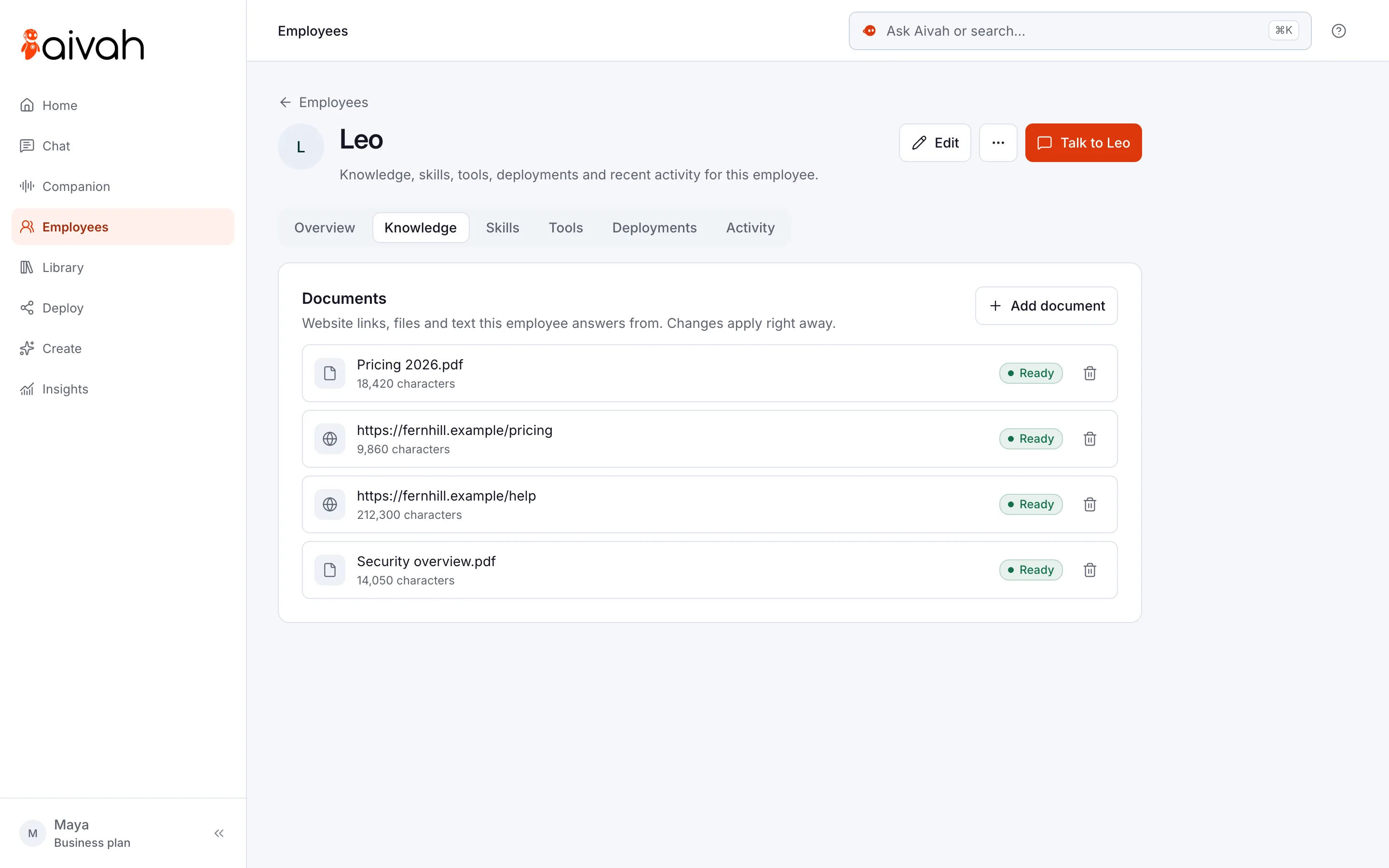
- Product pages: add your key pages as website links, or upload a product guide.
- Size charts and fit notes, including what to do between sizes.
- Delivery: where you ship, how long it takes, what it costs and how tracking works.
- Returns: time limits, condition, sale items, gifts and who pays the postage.
- Current offers with start and end dates, so it never quotes an old price.
- Handover rules: which problems go to your team, and what details they need.
Sources
Read related guides
How do you set it up on your shop, step by step?
Plan an afternoon. If you can edit your shop’s theme or site settings, you don’t need a developer.
Your AI employee also needs a handover rule in its instructions. For example: “If a shopper asks about one order, a refund or a damaged item, say our team will help. Ask for their name, email and order number.”
- Step 1: Hire an AI employee from the Resolution specialist template. Name it after the job, such as “Shop help”.
- Step 2: Add your key product pages as website links. Upload your size guide and policies, then add the handover rule.
- Step 3: Ask it ten real questions from your inbox, plus two it should pass on. Fix any wrong answer in the documents.
- Step 4: Publish a chat bubble and paste its code into your shop. On Shopify, it goes in your theme’s layout file, just before the closing body tag. On Wix, custom code needs a premium plan and a connected domain.
- Step 5: Decide whether to show the lead form, which asks for contact details before the chat starts.
- Step 6: Each week, read the conversations in Insights, where every chat, lead and call is saved.
Should the chat ask shoppers for their details?
The lead form shows before the conversation. You choose its fields: name, email, phone and your own questions. Every lead lands in Insights → Leads, and you can export the list as a CSV file.
For a shop, that is a trade-off. A form gives your team a way to reply, but some shoppers only want a quick answer. Fewer fields means more people fill it in.
So ask only for an email, with consent text that says how you’ll use it. Or leave the form off, and let the AI employee ask for details only when an order needs your team. Those details then sit in the chat history in Insights.
How does it compare with other ways to answer shoppers?
Each option does a different job well.
- An FAQ page is free and always there. But shoppers have to find it, and some would rather ask.
- Your shop platform’s inbox or a help desk built for shops lets a person reply, often with the order in view. Someone still has to be online.
- An outsourced chat team brings human judgment. You pay for their time, and they need training on your products.
- An AI employee answers from your documents at any hour, by text or, from Starter, by voice. It can’t see orders, so it hands those to your team.
Read related guides
What should you watch out for?
Know the limits before shoppers find them. Most are handled by habit, not software.
- No order look-ups. There’s no built-in link to your shop platform, so it can’t say where a parcel is.
- No live stock. A sold-out item stays “available” until you update the document.
- No refunds or payments. It explains your policy, and your team approves returns and refunds.
- Old prices. If a sale ends and the document doesn’t change, it will quote the sale price.
- On the shop phone, it answers from the call prompt you write, not from your product documents.
- Make one person own the documents, and update them the day a price or policy changes.
Questions shop owners ask about AI customer service
Can it tell a shopper where their order is?
No. Order look-ups aren’t built in. It explains your delivery times and how tracking works. For a single order, it takes the order number and contact details so your team can check.
Does it work with Shopify, Wix or WordPress?
Yes, as a chat bubble or an embed. You paste one line of code into your theme or site settings. There’s no built-in link to your shop’s orders or stock, so it answers from the pages and files you add.
Can it handle returns?
It explains your returns policy step by step, in your own words, and collects the details. Your team approves each return and issues any refund.
Can it answer the shop phone too?
Yes, from the Starter plan at $99 a month. It answers incoming calls on your own Twilio number (Twilio is the phone service your number runs on). On calls, it answers from the call prompt you write, so put your hours and key policies there.
What does it cost for a small shop?
You can start free, with no card and 1,000 credits. To put it on your website, plans start with Hobby at $10 a month, with 50,000 credits. Credits are what each reply uses, from 20 credits for a short reply.
Should shoppers know it’s AI?
Yes. Say so in its greeting, such as “Hi, I’m Shop help, an AI employee”. It also sets the right expectation: for an order problem, a person will follow up.
Try it on your own shop
Start free, add your size guide and returns policy, and ask it your three most common questions. If the answers sound like your best team member, put it on your shop.
Read related guides